
Download Passport Photo – Free Mac ID Photo Generator, Secure & Easy
Overview & Key Features
Passport Photo – An ID App is a dedicated macOS utility designed to simplify the creation of passport‑size photographs, visa pictures, and other official ID images. Launched in 2016 and continuously refined, the current version 2.0.3 (updated on 1 April 2017) offers a polished, user‑friendly interface that meets the strict dimension and background requirements of most government agencies worldwide. Built under the Science & Education category with a sub‑category focus on Geography, the app uniquely blends technical precision with an educational angle, helping users understand the visual standards for various travel documents.
What sets this tool apart from generic image editors is its automation of compliance checks, real‑time cropping guides, and built‑in background correction. Whether you need a U.S. passport photo (2 × 2 inches), a UK visa picture (45 × 35 mm), or a Canadian ID snapshot, the software adapts instantly. The app also supports batch processing, allowing families or small businesses to generate multiple compliant photos in one session, saving both time and printer ink.
- Automatic size detection for over 30 passport and visa formats.
- One‑click background removal with AI‑enhanced edge detection.
- Real‑time compliance meter that flags lighting, contrast, and head‑size issues.
- Batch processing for up to 20 photos per project.
- Export options: JPEG, PNG, and PDF ready for printing or online submission.
- Secure local processing—no images are uploaded to the cloud.
- Built‑in tutorial videos and printable guides for first‑time users.
- Regular free updates ensuring compliance with the latest governmental standards.
The software is available exclusively for macOS, supporting Mac OS X and later versions. It is distributed in English and can be downloaded directly from the developer’s website or trusted Mac app repositories. With 24 downloads since its addition to the catalog and a recent surge of 3 downloads in the past week, the app is gaining traction among travelers, photographers, and small‑scale ID service providers.
Installation & Usage Guide
Installing Passport Photo – An ID App on your Mac is a straightforward process that takes less than five minutes. Begin by downloading the .dmg installer from the official site. Once the file is saved, double‑click to open the disk image and drag the application icon into your Applications folder. macOS may prompt you to confirm the app’s origin; simply click “Open” to allow the installation, as the software is signed and verified for security.
After launch, the first‑time setup wizard walks you through basic preferences: default output folder, preferred image format, and the default ID type you most frequently need. You can also enable automatic updates, ensuring you receive the latest compliance tables without manual checks. The main dashboard features a clean layout with three primary tabs: New Photo, Batch Mode, and Settings.
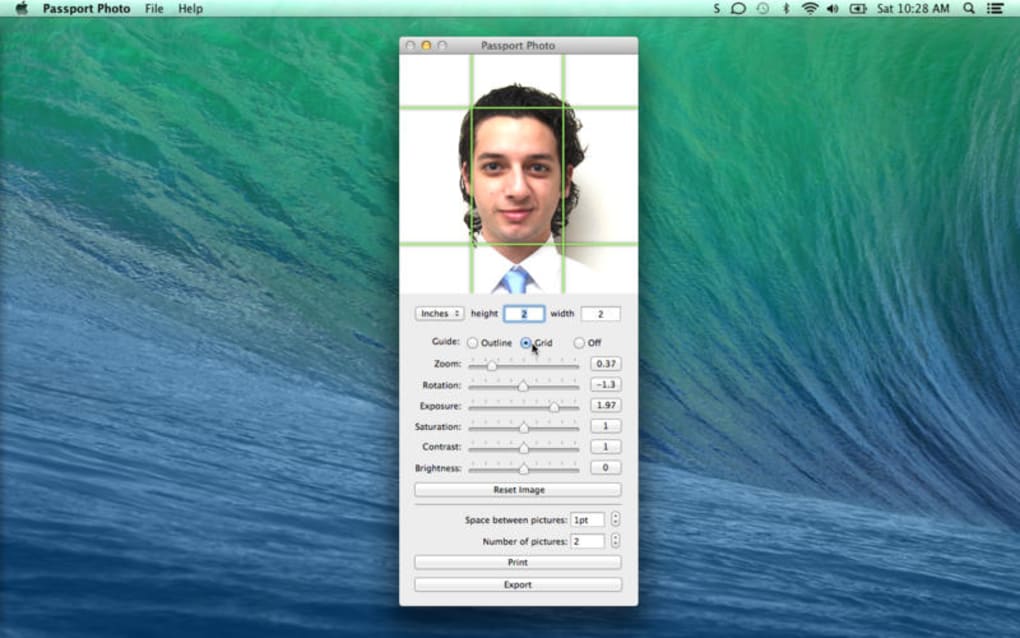
To create a single passport photo, click New Photo and import a high‑resolution portrait taken with a webcam or a DSLR. The app instantly analyses the image, presenting a live overlay that shows the required head‑height and facial position. Use the built‑in cropping tool to adjust the frame, then click Auto‑Adjust to let the AI correct the background and lighting. Once satisfied, press Export—the software saves a compliant file ready for printing or digital submission.
Batch mode follows a similar workflow but allows you to select multiple source images at once. After importing, you can assign different ID types to each picture, and the app will process them sequentially, generating a zip archive with all compliant photos. The entire operation typically completes within seconds, thanks to optimized macOS libraries.
For troubleshooting, the Help menu links to an extensive knowledge base, and the app includes a “Report Issue” button that sends anonymized logs to the development team. This ensures that any bugs related to new passport regulations are addressed promptly in subsequent updates.
Compatibility & System Requirements
Passport Photo – An ID App is built exclusively for the macOS ecosystem. It requires macOS 10.10 (Yosemite) or later, making it compatible with a wide range of Apple hardware—from older MacBook Air models to the latest Mac Studio. The app runs natively on both Intel‑based Macs and Apple Silicon (M1/M2) chips, leveraging Rosetta 2 when necessary to maintain performance parity.
Minimum hardware specifications are modest: 2 GB RAM, 150 MB of free disk space for the application bundle, and a webcam or external camera capable of at least 1080p resolution. For batch processing of large photo sets, a higher RAM configuration (4 GB or more) is recommended to avoid temporary slowdowns during background removal.
The software integrates seamlessly with macOS security features. All image processing occurs locally; there is no cloud upload, which aligns with privacy‑focused users and organizations handling sensitive personal data. The app also respects macOS Gatekeeper and notarization processes, ensuring that the installer is recognized as safe by the operating system.
In terms of language support, the user interface and help documentation are currently available in English only. However, the exported photos are universal and can be used in any country’s official documentation process. Future updates may introduce multilingual UI options based on user demand.
macOS 10.10 or later (Intel & Apple Silicon) is officially supported. The developer provides regular patches to address new OS releases, so users can expect continued compatibility with upcoming macOS versions such as Ventura and Sonoma.
Pros and Cons
- Pros:
- Fully automated compliance checks for dozens of international passport formats.
- One‑click background removal with AI precision.
- Batch processing speeds up work for families and small businesses.
- Local processing guarantees privacy; no data leaves your Mac.
- Regular free updates keep the app current with changing regulations.
- Intuitive UI that requires no prior photo‑editing experience.
- Cons:
- Available only on macOS; no Windows, Android, or iOS versions.
- English‑only interface may limit non‑English speaking users.
- Limited customization for artistic edits beyond compliance needs.
- Initial download size not disclosed; users must rely on disk space estimate.
Frequently Asked Questions
Can I use Passport Photo for visa applications other than passports?
Yes. The app includes templates for more than 30 visa and ID formats, covering common requirements for countries such as the United Kingdom, Canada, Australia, and Schengen states. Simply select the desired document type from the drop‑down menu before importing your photo.
Is my personal data safe when using the app?
Absolutely. All processing is performed locally on your Mac. The software never uploads images to external servers, and it adheres to macOS Gatekeeper standards, ensuring a secure environment for sensitive personal photographs.
Do I need an external camera, or can I use the built‑in webcam?
Both options are supported. While the built‑in webcam works for quick captures, a high‑resolution external camera (minimum 1080p) is recommended for the best quality, especially if you plan to print the photos at a professional lab.
How often is the software updated to reflect new passport regulations?
The developer releases updates at least twice a year, aligning with major changes in international travel document standards. Automatic update notifications can be enabled in the Settings tab to ensure you never miss a compliance patch.
Can I export photos directly to a printer from the app?
Yes. The Export dialog includes an option to send the generated file straight to any printer configured on your Mac. You can also choose PDF output for professional printing services that require high‑resolution files.
Passport Photo – An ID App delivers exactly what frequent travelers and small‑scale ID services need: speed, accuracy, and peace of mind. Its AI‑driven background removal and real‑time compliance meter eliminate the guesswork that often leads to rejected applications. While the lack of Windows or mobile versions limits its audience, Mac users will appreciate the seamless integration with macOS, the secure local processing, and the helpful tutorials that get anyone up to speed in minutes. Overall, it’s a solid, niche‑focused tool that earns a strong recommendation for anyone looking to create passport‑ready photos without hiring a professional photographer.
Conclusion & Call to Action
In a world where travel restrictions and documentation standards evolve constantly, having a reliable, easy‑to‑use solution on your Mac is invaluable. Passport Photo – An ID App combines automated compliance, AI‑enhanced editing, and batch processing into a single, secure package that saves both time and money. Whether you’re preparing for a solo adventure, assisting family members, or running a small ID‑photo service, this app equips you with the tools to produce flawless, government‑approved pictures on demand.
Ready to eliminate the hassle of photo‑studio visits and avoid costly re‑submissions? Download Passport Photo – An ID App now and start creating perfect passport photos instantly. Remember to enable automatic updates so you stay compliant with the latest international guidelines. Happy traveling!







